Cisco Router Configuration Basics: A Comprehensive Guide
Introduction
In the world of networking, Cisco routers are a crucial component that enables communication between different networks. Understanding the basics of Cisco router configuration is essential for network administrators, engineers, and anyone looking to advance their career in the field. In this article, we will cover the fundamental concepts of Cisco router configuration, including the must-know commands, configuration modes, and best practices.Understanding Cisco Router Configuration Basics
A Cisco router configuration involves setting up the hostname, securing privileged mode, configuring passwords, and assigning IP addresses to interfaces. Let's break down the essential commands and steps to get your router up and running:- Hostname**: Setting the hostname is a crucial step in configuring your router. Use the "hostname" command to assign a unique hostname to your router.
- Enable Secret**: Securing privileged mode is vital to prevent unauthorized access. Use the "enable secret" command to configure a secret password.
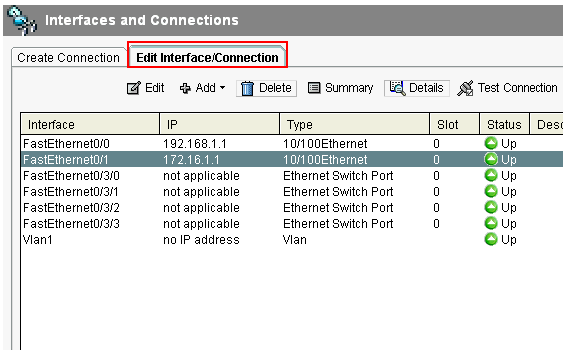
- Interface Configuration**: Use the "interface" command to configure IP addresses and enable interfaces. The "no shutdown" command is used to activate ports.
- Password Configuration**: Configure passwords for console and VTY lines using the "password" command.
Basic Configuration Examples
Here is a sample configuration example of a basic Cisco router configuration:- Configuring the Loopback Interface**: The loopback interface is used to support Network Address Translation (NAT) on the virtual-template interface.
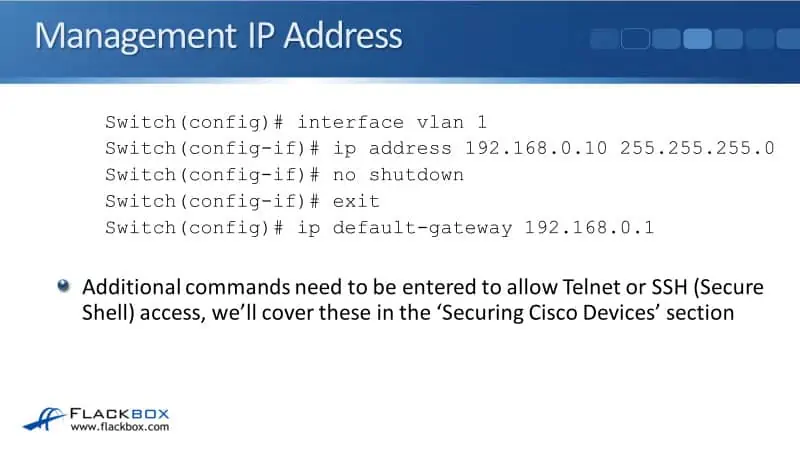
- Basic Layer Three Cisco Switch Configuration**: Assign a host name and create an enable hashed password, logically divide departments using VLANs, and assign an IP address and gateway.
Configuring Security Features

- Access Control Lists (ACLs)**: Configure ACLs to filter traffic and ensure that only authorized devices can access sensitive areas of the network.
- Encryption**: Enable encryption to secure data transmitted over the network.
- Authentication**: Configure authentication mechanisms to verify user identities and ensure secure access to the network.
Configuring IP Addresses and Networks
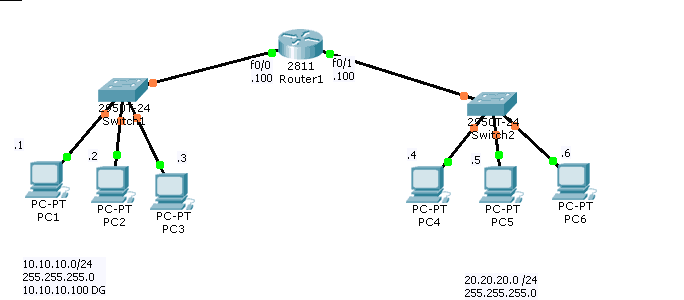
To configure IP addresses and networks, follow these steps:- IP Address Assignment**: Assign IP addresses to interfaces using the "ip address" command.
- Subnet Masks**: Configure subnet masks to divide the network into smaller subnets.
- Default Routes**: Configure default routes to specify the gateway of last resort.
Best Practices for Cisco Router Configuration
To ensure efficient and secure network operation, follow these best practices:- Use the Configuration Mode**: Use the configuration mode to make changes to the router configuration.
- Save and Reload**: Save changes regularly and reload the router to ensure that the changes take effect.
- Monitoring and Troubleshooting**: Regularly monitor and troubleshoot network issues to ensure optimal performance.