Will Wireless Router Block Internet from Other Devices?
In today's digital age, it's not uncommon for households and offices to have multiple devices connected to the internet through a single wireless router. However, at times, it's necessary to restrict or block specific devices from accessing the internet due to various reasons such as security concerns, bandwidth management, or parental control. This article will delve into the capabilities of wireless routers in blocking internet access from other devices.
Can a Wireless Router Block Devices from Internet Access?
Yes, a wireless router can block internet access from other devices. Most modern routers come equipped with features such as MAC filtering, access control, and Quality of Service (QoS) management that allow users to restrict or block specific devices from accessing the internet. However, the process and effectiveness of these features may vary depending on the router manufacturer and model.
MAC Address Filtering: A Common Method
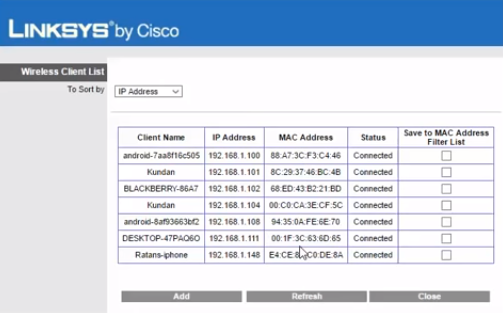
MAC (Media Access Control) address filtering is a popular method used by routers to block devices from accessing the internet. Each device connected to a network has a unique MAC address, which can be used to identify and block specific devices. To enable MAC address filtering, users typically need to access their router's settings and enter the MAC address of the device they want to block.
Access Control and Firewall Settings
Most routers also offer access control and firewall settings that allow users to block devices based on their IP addresses, subnet masks, and protocols. These settings can be used to create a whitelist or blacklist of devices, specifying which devices are allowed or blocked from accessing the internet.
Quality of Service (QoS) Management
QoS management is another feature found in many routers that allows users to prioritize traffic and allocate bandwidth to specific devices or applications. While not directly blocking devices from the internet, QoS management can help manage network congestion and prevent specific devices from consuming excessive bandwidth.
Using Third-Party Tools and Apps
In addition to built-in router features, users can also employ third-party tools and apps to manage and block devices from accessing the internet. These tools can provide more advanced features and customization options, but users should be cautious when installing and using third-party software, ensuring they come from reputable sources.
Common Scenarios and Solutions
- Blocking multiple devices at once: Many modern routers allow users to block multiple devices at once using features like MAC filtering or access control. However, users may need to manually enter the MAC addresses or IP addresses of each device to be blocked.
- Blocking devices during specific times: Routers may offer time-based filtering or schedule restrictions, allowing users to block devices during specific hours or days.
- Blocking devices with different network configurations: Users may need to adjust their router's settings and configure their network to accommodate devices with different network configurations, such as smartphones or smart home devices.
Conclusion:
In conclusion, wireless routers can indeed block internet access from other devices, but the process and effectiveness of these features may vary depending on the router manufacturer and model. Users can leverage built-in features like MAC filtering, access control, and QoS management, or employ third-party tools and apps to manage and block devices from accessing the internet. By understanding and utilizing these features, users can maintain a secure, efficient, and well-managed network for their devices.
Additional Tips and Considerations:
- Routersettings and configurations: Familiarize yourself with your router's settings and configurations to maximize its potential in blocking devices.
- Device compatibility: Ensure that the devices you want to block are compatible with your router's features and settings.
- Additional security measures: Implement additional security measures, such as firewalls and antivirus software, to protect your network from malware and unauthorized access.








.jpg "Wi-Fi Interference: 7 Things That Block Wi-Fi Signal | AT&T")