MikroTik RouterOS Firmware Update Guide
Introduction
MikroTik RouterOS is a dynamic operating system used in a wide range of networking devices. The RouterOS firmware is constantly being updated to ensure better performance, access to new features, and security patches. In this comprehensive guide, we will walk you through the process of upgrading your RouterOS firmware safely without bricking your device.Why Upgrade RouterOS Firmware?
Upgrading your RouterOS firmware is essential to ensure that your device remains secure and stable. When you upgrade your RouterOS firmware, it also keeps your device compatible with the latest features and bug fixes. This ensures that you have access to the latest security patches, performance improvements, and new features.Pre-Upgrade Checklist
Before upgrading your RouterOS firmware, make sure to: * Backup your configuration to avoid any potential data loss * Check for any running tasks or scripts that may interfere with the upgrade process * Ensure that your device is connected to a stable power source and has sufficient memory and processing power * Verify that your device is running the latest RouterOS firmware versionManual Upgrade Process
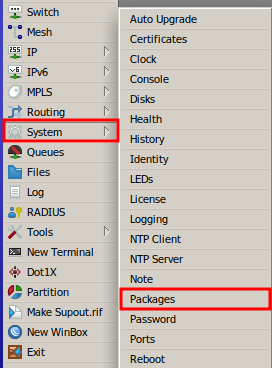
To manually upgrade your RouterOS firmware, follow these steps: 1. Visit the MikroTik Software page and select the architecture of your RouterOS system (system architecture can be found in System → Resource section). 2. Download the latest RouterOS (main) and extra packages that are installed on your device. 3. Upload the packages to your device using one of the following methods: * Menu interface: Select System → Packages → Upload Package * WinBox: Connect to your device using WinBox and navigate to System → Packages → Upload Package * WebFig: Connect to your device using WebFig and navigate to System → Packages → Upload Package 4. Once the packages are uploaded, reboot your device to apply the updates. 5. Verify that the firmware upgrade was successful by checking the RouterOS version in the System → RouterBOARD → Upgrade menu.Automatic Upgrade Method