How to Set Up a Home Wireless Network: A Step-by-Step Guide
Setting up a home wireless network can seem like a daunting task, but with the right guidance, it's easier than ever. In this article, we'll take you through the step-by-step process of setting up a wireless network in your home, covering everything from establishing a connection to securing your network.
Understanding the Basics
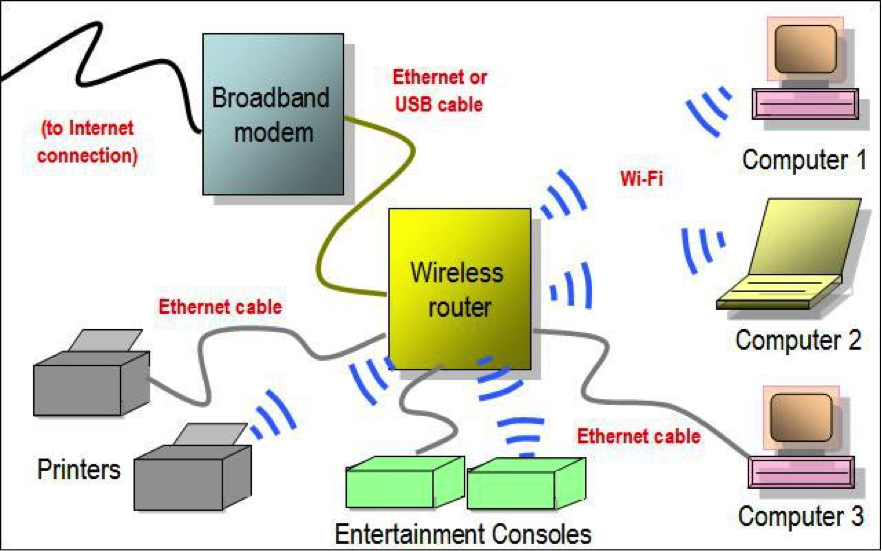
Before you begin, it's essential to understand the basics of a home wireless network. The three primary components you'll need are:
- A Modem: connects you to the internet service provider (ISP)
- A Wireless Router: connects devices to the network and provides Wi-Fi connectivity
- Devices: laptops, smartphones, tablets, and other devices that connect to the network
Step 1: Choose Your Internet Service Provider
The first step in setting up a wireless network is to choose your internet service provider (ISP). Research and select a reliable ISP that offers a suitable plan for your needs.
Step 2: Obtain Your Wi-Fi Equipment
Once you've chosen your ISP, obtain your wireless router and modem from the provider or purchase one from a reputable retailer. Make sure the router is compatible with your devices and meets your internet speed requirements.
Step 3: Set Up Your Router
Unbox and unplug your router and modem. Follow the manufacturer's instructions to physically set up the router, including installing antennas and configuring the device.
Router Placement
When placing your router, consider covering the maximum area of your working space for optimal coverage. Avoid placing it in small closets or areas with metal objects that can obstruct the signal.
Step 4: Connect Your Devices to the Network

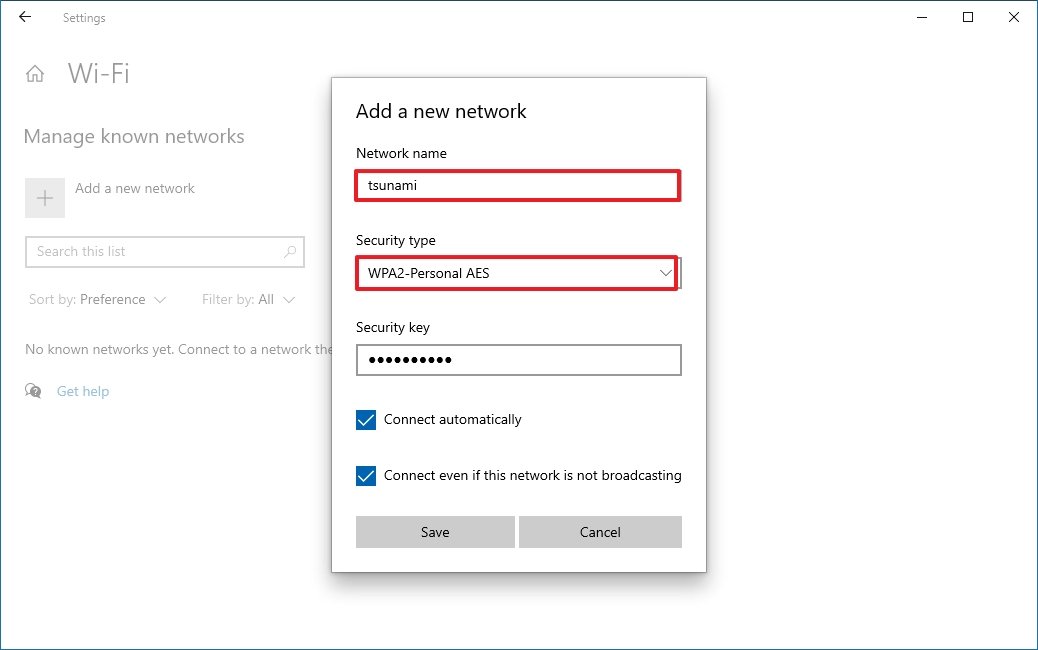
Once you have your router set up, connect your devices to the network using the Wi-Fi connector. Make sure to use the correct Wi-Fi settings for your router and devices.
Step 5: Secure Your Network
Security is a crucial aspect of setting up a wireless network. Change the default administrator password, enable the firewall, and set up a guest network for additional security.
Step 6: Share Files and Printers
With your network set up, you can start sharing files and printers with other devices on the network. Follow the instructions provided with your router to set up this feature.
Step 7: Test and Optimize Your Network
Once you have your network up and running, test the connection speed and range using online tools. If needed, reposition the router or adjust the antenna settings for optimal performance.
Conclusion
Setting up a wireless network in your home may seem like a daunting task, but breaking it down into these steps makes it manageable. By following this step-by-step guide, you'll be able to establish a reliable and secure wireless network for all your devices.
Additional Tips
- Regularly update your router's firmware to ensure the latest security patches and features.
- Use a strong password for your router and Wi-Fi network.
- Position your router in a central location for optimal coverage.
Final Thoughts
Setting up a wireless network is a process that requires patience and attention to detail. By following these steps and taking additional precautions, you can create a secure and reliable network that meets your needs.